I have just bought a second hand Archos 5 IT to replace my larger Archos 7 Home Tablet. So despite the smaller screen, and prior release date is it better ?
Archos 5 IT
My Archos 7 Home Tablet was pretty good for the price but a pain to use mostly because of the very bad resistive touchscreen (with part of it shifted), and perhaps because of low horsepower and available ram compared to the requirements of Android.
I bought a second hand 8 Gb version for 112 euros on Ebay, including postage and packing. This is rather cheap as the 8 Go is still 199 euros on Archos website although you can find it in France for 129 euros at Boulanger website
In its box
It’s the 8 Go version, the cheapest
Android, Internet, GPS, even digital TV with the right add-on
Archos 5IT manual, micro-USB cable, plastic stand, headphones, DVD with GPS software
High resolution resistive touchscreen at 800 x 480 for 5 inches
Micro-sd card on the left
Headphones and Micro-USB port on the side
Back in stainless steel
Includes vertical stand in steel
In the Archos pouch
Firmware Android 1.6 Donut installation
Android 1.6 Donut is a huge improvement compared to the previous 1.5 Cupcake version.
First you need to download the .aos file on Archos site.
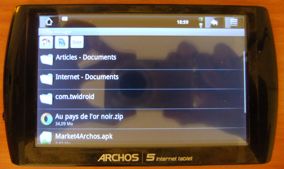
Drag and drop in root directory
Automatic detection when you remove the USB cable
Pretty clever, requires USB charging in case of power supply problems
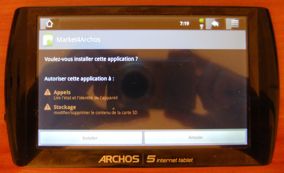
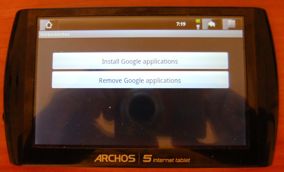
Gmail, Google Maps, Google Talk in addition of Marketplace
And you can update latest version on Marketplace (ex: Googlemaps with turn and turn navigation)
Accessories
Bluetooth Keyboard
Let’s try my ThinkOutside Azerty Bluetooth Keyboard
Detection is OK
But connection fails
I tried 10 times and it didn’t work.
It doesn’t say it but you must choose a pairing code on the Archos 5IT and quickly enter the same code on the ThinkOutside ! After you do this blindly it can work.
Compare this to its competitor, the iPhone choose the code and ask you to enter it on the ThinkOutside clearly.
Unfortunately whatever your locale setting, Android only recognizes keyboards as QWERTY
This is the rule whatever the keyboard connection - bluetooth or USB even if you root the tablet.
Two failures on Android here: bad keyboard pairing and recognizes only QWERTY US keyboards and just ignores 4 or 5 billion people on earth. Apple is far better on this: either it don’t work or work perfectly.
Software
Note: for all the alternative software source used below, you might need a file explorer to launch the .apk installation file.
Think Office 2.0
Source: Archos default installation
All applications installed with firmware 1.6, including Think Office 2.0
Think Office 2.0 is a Word, Excel, Powerpoint viewer and editor supplied with Archos 5 IT.
Which needs activation by internet
It works pretty well and is free with the tablet.
Navigator
Source: Archos default installation
Internet browser on Android 1.6 Donut
Stock browser works pretty well and is quicker than iPhone 3G. Doesn’t work with flash (need Android 2.2 Froyo for this).
ADW Launcher
Source: Android Market
Alternative desktop
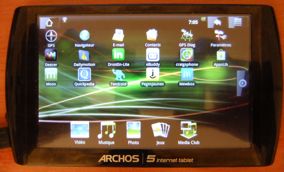
Archos stock desktop: notice the specific Archos applications on the bottom
You lose all the specific Archos applications with the alternative desktop: all multimedia music, pictures, videos but also other stuff like Archos Media Store or RDS FM Radio.
ADW Launcher works on portrait
So why make the switch ? ADW Launcher is marginally faster but mostly more configurable.
It works under portrait too. I use it mainly to have only one desktop and remove options to simplify the interface.
You can choose by pressing the Home icon the default desktop program
But after you will really not have access anymore to Archos programs.
To restore access you can change ADW Launcher settings in Applications and remove Launch settings
OI File Manager
Source: Android Market
Great file manager
Easy navigation which display clickable path a bit like Pathfinder under Mac OSX
You can use it to install .apk files.
Pulse
Source: Android Market
It’s a great RSS feed reader
It’s the same as iPad version which can display as RSS text or web pages
All the dozen versions says they are expired except 1.0.1G which crashes and 1.0.1H which works but with a low resolution keyboard.
Many failures on Android here:
– first new versions on Google Marketplace which don’t work and crashes previous version which worked fine
– second no possibility to go back to the previous version on Google Marketplace (on iPhone it’s possible if you kept the .ipa, and on some alternative Android marketplace it’s possible, see below)
– third no firm guidelines which allows a software developer to do anything to make previous version expire (forbidden under Apple Store rules) and even disable the keyboard altogether, sort of hold user hostage.
In this case, you’re cornered, the new software don’t work, the old one don’t work anymore and it’s only a freeware, not a copy protected paid software.
Thankfully I found an alternative keyboard solution:
It’s also under Google Code, this time with full source, very few download counts.
Archos AppsLib
I got my initial working version of Vietnamese IME from Archos AppsLib (I think it was 1.0.1.H.
It crashes
Now it always crashes even after reinstallation.
Another Android failure: bad software design. It crashes, and I think it’s because the server is down. I cannot even use other functions like uninstall when there is no Archos server up either. And it doesn’t crashes gracefully with a nice warning, but two times out of three it’s a genuine crash.
Google Marketplace
French subtitles with english
Another Android failure: 99% of marketplace content are in English with english comments. I don’t have anything against english, but compared to Apple Store where 90% of the content of the french store is in french, you have an unusable store for 4 to 5 billion people on earth. That might be linked to the relaxed guidelines of the Google Marketplace compared to Apple Store strict Guidelines.
Additional failure: I think the content is already filtered to be compatible with your device - but it doesn’t work (see Vietnamese IME) so you have all the cons without the pros (in case one program listed not to work just because the developer doesn’t have the device, would work)
Add to that one last failure already reported: no possibility to download previous version of the program.
Caveat: I have an hacked Google marketplace on my Archos 5 IT. Perhaps on a supported platform it is better.
Android Freeware
I really hate AppsLib and Google Marketplace. I’ll explain why: to find one program that work I have to try at least 15 to 20 which crashes or are junk, with no reliable description (pictures ?) or comments. And most of time I don’t find any.
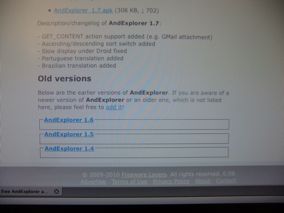
There are alternative Android stores which reduce all that hassle by providing a simple .apk file which is easy to install and which you can keep in case of problems.
And it has the good taste to keep previous versions for download
Mac OSX and Archos 5 IT
Mac OSX doesn’t recognize the Archos 5 IT. It is pretty simple to make Archos 5 IT appears as an external USB drive.
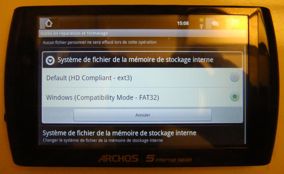
Go to parameters, internal file system
And select Windows Compatibility Mode FAT32 system
The system will reformat the internal drive (you will lose your data).
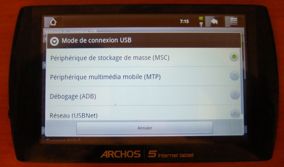
Go to USB connection mode
And select MSC (Mass storage connection) mode.
Now when you select Mount after plugging the USB cable
It will show as a flash drive
Other alternative: Xnjb
Most internet sites gives another method which is using XNJB under Mac OSX program which was made for Creative media players. It works but is less convenient than mass storage.
Note: You must update Archos and/or Android library if you want to display new media using Archos and/or Google default applications.
In Preferences USB settings
Multimedia Library: update all libraries
Archos 5 IT versus Archos 7 HT
Archos 5 IT box next to Archos 7 HT box
Archos 5 IT really looks tiny with two inches less but almost half of the screen surface
Next to iPad
Test
Type
iPad
Archos 7HT
Archos 5IT
Ratio
Comments
Boot
Hardware
22.8 s
50.4 s
45.5
1.11x
Almost same boot time for the two Archos
Shutdown
Hardware
2.3 s
1s
6.8 s
x0.13
Shutdown more than 7x slower on 5IT but still less than 7 seconds
Processor
Hardware
Cortex A9 1 Ghz
Arm 9 600 Mhz
Cortex A8 800 Mhz
3x
3x faster than Archos 7 Home Tablet, faster than Iphone 3G but slower than iPad
Memory
Hardware
256 Mo
128 Mo
256 Mo
Double memory for the Archos 5 IT
Battery
Hardware
10h
10h+
1x
Perhaps slightly better on Archos
Battery Charge
Hardware
5h
?
?
?
Web browser - Tomshardware
Web
9.9 s
26.4 s
15.6 s
1.7x
Archos 5 IT is 70% faster, but 7 HT is still acceptable
Web browser - Toucharcade
Web
15.5 s
44 s
26.6 s
1.7x
same
Photos thumbnails
Photo
instant
slow
slow
1x
Archos 5 IT is around the same speed with Google Gallery from 7 HT but twice slower with integrated Archos 5 IT photo display program
167 Mo USB file transfer - write
Hardware
8.4 s
58.1 s
25 s
x2.3
Flash memory on Archos 5IT 2.3 times faster than Archos 7 HT
167 Mo USB file transfer - read
Hardware
16.5 s
24.5 s
12.6 s
x1.95
For read operations, Archos 5IT is even faster than iPad !
Crashes
Hardware
same
same
same
Donut 1.6 doesn’t seem more stable but with added Archos 5 IT horsepower it crashes at least faster
Wifi
Hardware
same
same
worse
0.5x
Wifi is worse on Archos 5 IT when the Wifi signal strength is low. Perhaps it’s because the smaller size means shorter Wifi antennas ?
Usage
The 5 IT has exactly the same resolution as the 7 HT
If you have good eyesight, web browsing is the same with the added benefit of far more portability. It is also far more confortable than the iPhone 4 which has increased resolution (960 x 640 versus 800 x 480), but with a screen too small (3.5 inches versus 4.8 inches).
Most web sites still readable compared to iPad
Tintin on Archos 7 HT and 5 IT
Reading comics with Droid Comic Viewer was fine on 7 HT and even better on 5 IT because it is faster.
Archos 5 IT can’t play 1080p HD videos
That’s fair enough, but more annoying is some regular AVI which plays perfectly on the 7 HT aren’t recognized by Archos 5 IT either.
Archos 5 IT Cinema Plug-in
To try to solve the problem of regular AVI taken from a digital camera not working and following some leads on internet forums, I purchased Archos 5 IT Cinema Plug-in.
The AVI is according to Quicktime in Apple Open DML JPEG, but I think it is just Apple term for MJPEG format, very common on most digital cameras.
Purchase in the Archos Store, not AppsLib
Two plug-in are purchasable: Cinema and GPS
The cost is 15 euros, which is not cheap or too expensive.
GPS Plug-in is not really worth it because the GPS in the Archos 5 IT has a rather slow fix although the software seems fine.
After confirmation, payment by credit card
It’s already installed
Don’t know what happen if I upgrade firmware or reformat the device though.
Still doesn’t work
So I lost 15 euros, the plug-in didn’t work for my purpose.
Conclusion
Compared to my Archos 7 Home Tablet, the Archos 5 IT has lots of pros:
– far more portable and pocketable. It is easier to hold too.
– Android 1.6 Donut which allows far more software compatibility
– Far more powerful, 256 Mo of ram versus 128 Mo, Cortex A8 at 800 Mhz which is around 1600 DMIPS compared with 600 DMIPS for 7 HT 600 Mhz Arm9. It is around 3 to 6 times faster, and it has a huge impact: far less interface lagging.
– no need to kill tasks anymore because of added ram and power
– GPS
– Accelerometer (automatic switch from Portrait to Landscape mode)
– Bluetooth. 3G tethering via Bluetooth.
– Open GL which allows 3D games
– RDS FM Radio
RDS FM Radio, works well but only with headphones, can crash without them
– USB charging
– better color display (Archos 7 HT screen is fine but you clearly see that the display has a limited color palette)
But most of all a good resistive tactile screen, on part with Nintendo DS, very consistent unlike the Archos 7 HT (where part of the screen is good and others are not). Combined with the strong horsepower it is a completely different machine, a pleasure to use whereas the Archos 7 Home Tablet was a pain to use.
Some cons compared to the Archos Home Tablet:
– smaller screen (perhaps half the surface). For showing photos or for old people with eyesight problems it could be an issue.
– less compatible with video formats
– no mains charger supplied (must use USB charging, or for example an iPod USB charger)
All in one a slam dunk, I’m very happy to have swapped my Archos 7 Home Tablet for an Archos 5 IT, I sold my Archos 7 Home Tablet for 106 euros including P&P, so it was only a net cost of around 25 euros after eBay fees.
It can beat my iPad too, the iPad is so heavy I have to rest it somewhere if I use it more than 5 minutes (that means I must rest myself too). Not convenient outside of home (your home or friends home). This is not the case for the Archos 5 IT which is less than 200 grams which you can use everywhere in most situations for internet browsing, and with a screen size more confortable than a typical smartphone like the iPhone 4.
Why I think Android is a failure
I’m pretty happy with the hardware of my Archos 5 IT, and even with the right software I installed on it, so why I think Android is a failure ?
Because I think the design is bad from the start from a software point of view, perhaps even more than Windows / MSDOS combination.
As you can see above there were lots of software related problems:
– keyboard not recognized except as US QWERTY
– marketplace software not working, crashing, without clear pictures or description, not in the right local language, updates not working with your device and no way to fall back to previous version, software with very bad design or expiry dates possible
The result is you lose lot of time to find the right software (even with pretty basic needs), and all the google infrastructure is a hindrance rather than a help - I’d almost rather configure my Archos 5IT on a command line.
I have thought about it and I think it is related to the relative freedom for Android developer. It is not intuitive because somehow in western countries freedom is linked to good things.
It’s very simple: Android freedom is mostly freedom to do stupid things. So that means lots of software will have stupid problems or inconsistent interface.
Whereas AppleStore rules are mostly very intelligent rules for 99% of them and forces developer to be intelligent (or not waste lots of time reinventing the wheel), the result is a far more satisfying experience for the end user.
Think about this software could be like a car, Apple would force all manufacturers to have round wheels. Google says you can use any wheel so many developers would use square or triangles wheels. Yes you have freedom but to do stupid things when there is a solution (round wheel) which would be better than at least 90% of other wheel shapes.
So Apple cars would be better than at least 90% of Google cars ! That’s what happening right now.
And it’s too late for Google to turn back on this as there are already 100 000 software out on its marketplace with these anarchic rules. Of course Google might still win just by the strength of its numbers, but that means a majority of the people will just end up with inferior products and experience because they don’t know better, not because Google is better. 1-2% of Google might be better because you would have picked software made by better developers which chose better rules than Apple ones, but you would lose a lifetime before finding them, like under Windows so I think it is not really worth it.